Powerful Features
Everything you need for professional DLL injection
Modern GUI
Clean, responsive interface built with egui with smooth animations
Animated Transitions
Fade-in, slide-in, and window scaling animations
Process Browser
Visual selection from running processes with search functionality
Auto Configuration
Saves your settings (DLL path, process preferences) between sessions
Auto Inject
Automatically inject when target process is detected
Injection History
Tracks last 10 injections with timestamps
Real-time Logging
Monitor injection status with animated log entries
Lightweight
~4.5 MB executable with minimal dependencies
UWP Detection
Detects UWP apps (WindowsApps/AppPackages) for informed injection decisions
Architecture Detection
Prevents 32-bit/64-bit mismatch errors with validation
Admin Status
Real-time administrator privilege indicator with pulse animation
Robust Error Handling
Comprehensive error types with actionable messages and suggestions
Clean Interface
Simple, intuitive design that gets the job done
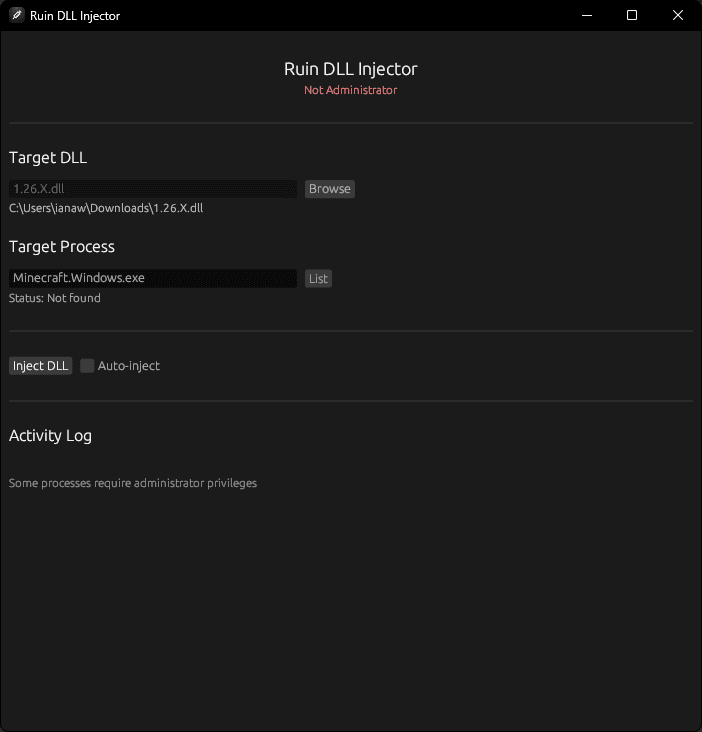
Ruin DLL Injector v1.3.3 - Main Interface
Technical Implementation
Built with modern technologies and best practices
Tech Stack
Injection Process
- 1Process Discovery - Enumerate running processes
- 2UWP Detection - Identify UWP apps for informed decisions
- 3Architecture Validation - Ensure 32/64-bit compatibility
- 4Process Access - Open with required permissions
- 5Memory Allocation - Allocate memory in target
- 6DLL Path Injection - Write DLL path to memory
- 7Remote Thread Creation - Create execution thread
- 8Cleanup - Free memory and close handles
Core Windows APIs
CreateToolhelp32SnapshotProcess32First/NextOpenProcessIsWow64ProcessQueryFullProcessImageNameWVirtualAllocExWriteProcessMemoryGetProcAddressCreateRemoteThreadLoadLibraryWCloseHandleAnimation System
trait Animatable {
    fn update(&mut self, dt: f32);
    fn is_complete(&self) -> bool;
}

const ANIMATION_DEFAULT_SPEED: f32 = 0.12;
const PULSE_SPEED_DEFAULT: f32 = 0.03;

struct Fade { current: f32, target: f32, speed: f32 }
struct Scale { current: f32, target: f32, speed: f32 }
struct Slide { current: f32, target: f32, speed: f32 }
struct Pulse { phase: f32, speed: f32, amplitude: f32, base: f32 }Error Handling
pub enum InjectionError {
    ProcessNotFound(String),
    OpenProcessFailed(String),
    MemoryAllocationFailed(String),
    WriteMemoryFailed(String),
    CreateRemoteThreadFailed(String),
    InvalidPath(String),
    InvalidProcessName(String),
    PathTooLong(String),
    DllLoadFailed(String),
    ThreadWaitFailed(String),
    UwpProcessNotSupported(String),
}Documentation
Quick start guides and detailed instructions
To build from source, run the cargo command. The compiled executable will be at `target/release/ruin-injector.exe`.
For developers:
cargo build --releaseReady to Get Started?
Download Ruin DLL Injector and start injecting DLLs into your Windows applications.
Fast & Lightweight
~4.5 MB executable
Safe & Secure
Proper error handling
Modern UI
Smooth animations